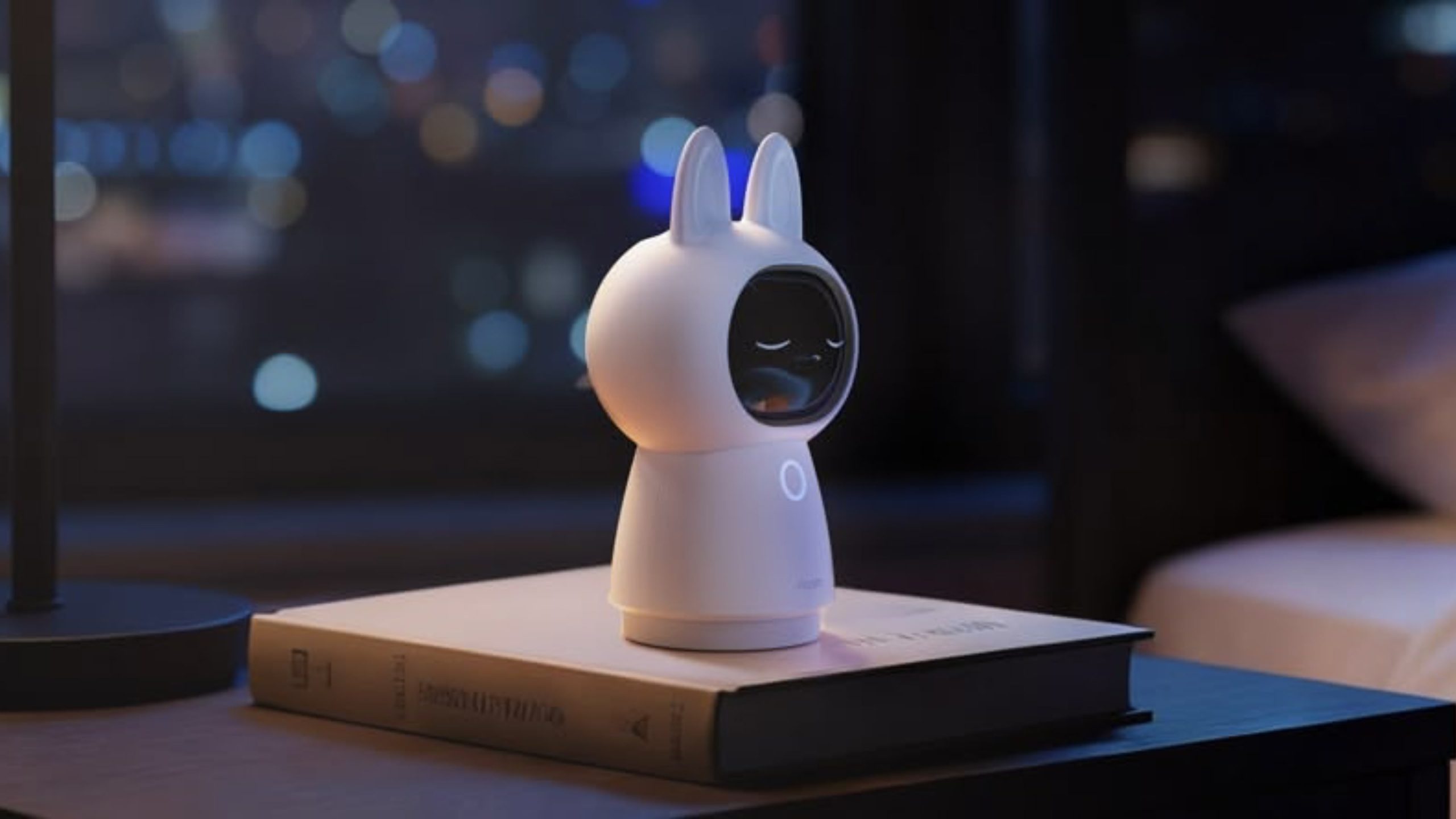
Smart home device maker Aqara launched the Camera Hub G350 in March, and it is the first Matter-certified smart camera on the market. Cameras are included in Matter 1.5, and while Apple doesn’t support Matter cameras yet, Aqara’s camera still works with Apple Home. For Apple users, Matter integration doesn’t provide any benefit, but it adds cross-platform support for Google Home, Alexa, SmartThings, and more.
The Camera Hub G350 is my favorite indoor home security camera that I’ve tested to date, and not just because it’s wearing a cute bunny-ear costume. It records in 4K and has zoom capabilities, plus it has movement tracking and can rotate 360 degrees.
There are two cameras in the G350, and the design makes the lenses look like eyes. If you don’t like the cutesy style, you can take off the silicone bunny hood, which makes the G350 look more like a traditional security camera.
You can view the G350’s feed through Apple Home, and it connects as a HomeKit Secure Video camera. Footage is stored in iCloud, and as with other ?HomeKit Secure Video? (HSV) options, you need an ?iCloud?+ plan. The $0.99/month 50GB plan supports a single HSV camera, the $2.99/month 200GB plan supports five HSV cameras, and the higher-tier plans that start at $9.99/month for 2TB storage support an unlimited number of cameras.
Using the G350 with HomeKit limits you to the ?HomeKit? set of features. You can view the feed in the Home app, add the camera to automations, and customize when the camera is recording and when it’s not using geofencing. It supports notifications for movement, can recognize people and animals for customized notifications, and it has facial recognition. Unfortunately, though this is a high-resolution camera, HSV is limited to 1080p.
Because the Camera Hub G350 offers so many features that are not available in ?HomeKit?, it’s not worth getting if you’re only going to use it with Apple Home. You need the Aqara app to get the full functionality, but I do think the feature set is worth venturing out of the Home app for.
The wide-angle 4K camera with a 133-degree field of view is the main camera, but there’s also a 2.5K HD camera for zooming in up to 9x to get a closer look. The camera feed is clearer than what I get from ?HomeKit? because of the resolution restrictions. This is the only camera I have that has a second lens for zooming in, and the zoom is sharper than what I get from single-lens cameras.
Aqara says the camera has an f/1.6 aperture and 940nm infrared LEDs for night vision, and it does do well in low lighting conditions and at night. Recordings are not as clear as when there’s optimal lighting, but the night vision works as expected, offering a grayscale view of what’s going on.
The G350 can rotate 360 degrees, and there is an included AI auto-tracking feature. It can recognize people and pets, turning the camera to keep them in view, and zooming in slowly where appropriate. It tilts too, which is helpful for keeping people and pets in view. You can have the camera track motion with AI, but you can also use pan and tilt controls in the app to control it while watching the feed live. I don’t need to reinvent the wheel, so Aqara’s video showing the panning, tilt, and zoom is embedded below. The camera and the app do work as demonstrated in the video.
The tracking works well, and it can be somewhat creepy to have a camera following you, so it might be a good theft deterrent. It’s clear when it’s moving to keep you in view, but there is no audible sound when it’s panning. It is meant to pan slowly, so there can be a little bit of blur in recordings when the camera is moving or when you use the zoom feature. The Aqara app has an option for selecting preset angles that the camera will quickly pan to so you can see different areas of a room.
The camera has on-device AI processing that can recognize faces, pets, gestures, and select sounds. It can detect coughing, snoring, loud sounds, alarms, a dog barking, and a baby crying, sending alerts when it hears the sound.
I often think that Aqara includes too many features in its products, but it gives people options. The camera supports gestures, so you can trigger scenes that you’ve set up in the Aqara app with a wave or an OK sign. This is a beta feature, and it’s not super reliable, especially when the lighting is bad. I don’t know why, but the G350 also has smile detection and will send you a notification when it detects someone smiling. It does successfully detect motion, follow me around, and detect smiles, though the latter feature hasn’t worked 100 percent of the time.
For those who don’t want footage uploaded to the cloud, there is an option to record to a 512GB microSD card. Footage can be saved to a NAS, you can use Apple Home’s ?iCloud? storage, or you can use Aqara’s cloud storage. You don’t need a subscription for Aqara’s cloud storage, but some features are locked behind one.
Aqara has a HomeGuardian subscription service that’s $4.99 per month or $49.99 per year for a single camera, or double that for unlimited cameras. It adds 90 days of video event history, package and vehicle detection, face detection, AI video summaries, AI video search, fire detection, alarm notifications, unlimited storage space, and video downloads from the app. So you can use local storage or the free cloud storage, but you lose some features.
There is a mode that physically disables the cameras with a cover that makes the “eyes” look like they’re closed, which is both cute and useful. This mode also reveals the microSD card slot, and you stick the card in the “mouth.” The camera-off mode can be enabled by tapping the little eye icon in the Aqara app. There is a speaker and microphone for two-way conversation.
I cannot think of a camera feature that I want that’s not already in the G350, except maybe rich notifications. The motion detection alerts that come from the Aqara app don’t provide me with a preview of the motion like my Ring cameras do.
If you have other Aqara devices, the G350 works as a hub for them. I have Aqara thermostats, so this serves as a functional hub and improves connectivity between Aqara products. It’s also a Thread Border Router for Thread devices and a Matter Controller. It can use either a 2.4GHz or 5GHz connection.
The Camera Hub G350 is meant to be plugged in all the time, but for some reason Aqara didn’t include a power adapter. There’s a USB-C cable, but no charger, so you’ll need to supply your own. It takes a 10W USB-C power adapter or higher.
Bottom Line
With the pan and tilt features and automatic tracking, the G350 is an excellent indoor camera. It’s perfect in a baby’s room or for tracking pets, but it also works well for general home security use.
It supports local storage for those who don’t want data uploaded to the cloud, and while some features are locked behind a subscription, all of the most useful options are readily available without paying extra.
How to Buy
The Aqara Camera Hub G350 is available from Amazon for $140.
Note: Aqara provided MacRumors with a G350 Camera Hub for the purpose of this review. No other compensation was received.This article, “Aqara Camera Hub G350 Review: 4K Recording, Dual Lenses, Pan-and-Tilt Tracking, and AI Subject Detection” first appeared on MacRumors.comDiscuss this article in our forums
Go to Source
Author: Juli Clover