Skip to content

Apple Day – Apple, iPod, iPad, iPhone, iTouch, iMac, iBook

Apple Day – Apple, iPod, iPad, iPhone, iTouch, iMac, iBook

Inside iOS 9: HomeKit Gains Simpler Set Up, Pre-Defined Scenes, Triggers and More

Posted on September 17, 2015 By admin

HomeKit officially became available in June, with the launch of the first HomeKit-compatible products, but as we’ve highlighted in reviews, Apple’s home automation platform is still in need of some work to make it a viable choice for most users.

With iOS 9, Apple is debuting several new HomeKit features that have the potential to significantly improve the way it works, by simplifying some of the setup process broadening supported device types, and introducing key automation features to cut down on user interaction.

Setup

Setting up HomeKit devices isn’t difficult, but it does require users to enter a unique HomeKit identifier to pair with an iPhone. In iOS 9, Apple will support scanning the code with the camera, shaving some time off of the setup process. Information displayed during the setup process, like icons, brand names, and images, is also improved, making the process somewhat more streamlined.

Scenes

With HomeKit, one of the most confusing and time consuming things to set up are scenes, which allow several devices to work in unison at a specific command. For example, when arriving home, one might want a scene that turns on the air conditioner and turns on the lights, a task that can be accomplished with a Siri command like “Turn on the Home scene.”

wakeupscene
Scenes are useful, but their setup in iOS 8 is not always clear, especially to users who are new to HomeKit. In iOS 9, scenes are more straightforward because developers can add four pre-defined scenes to apps designed to work with their HomeKit-enabled devices. Pre-defined scenes include Getting Up, Leaving Home, Returning Home, and Going to Bed, and will walk users through setting up their devices for each occasion. Siri will automatically recognize these scenes, so Siri response to Scene queries should improve.

To differentiate pre-defined scenes from user-made scenes, user created scenes will be called “Custom Scenes” going forward.

Support for New Types of Devices

iOS 9 adds support for new kinds of connected devices and sensors, paving the way for more HomeKit accessories and better interaction with those devices. Window coverings like blinds and shades are now supported in iOS 9, as are motorized doors and windows, complete home security systems, and programmable switches.

New sensors that will be supported in iOS 9 include those that detect things like carbon monoxide, smoke, and water leaks, and those that monitor air quality and humidity. Sensors that detect motion and movement will also be included in HomeKit in iOS 9.

Remote Access

With iOS 9, Remote Access is improving. It will no longer be necessary to have an Apple TV to access HomeKit devices when away from home because Apple has a new iCloud service that device makers can use for their HomeKit accessories. Before iOS 9, accessing HomeKit devices remotely required them to connect to an Apple TV or it required accessory makers to implement their own cloud services.

In our experience, Remote Access through the Apple TV is unreliable, so hopefully the iCloud change will improve things quite a bit.

Triggers

Triggers are one of the most important new features in iOS 9 because in future devices, they’ll allow for a lot more automation. Triggers can be based on location, time of day, and can be set off by the activation of another HomeKit accessory. For example, a HomeKit device that senses when the front door opens will know when you arrive home, automatically setting off a sequence of connected events such as turning on the lights and lowering the temperature.

Developers have access to build triggers into their HomeKit apps going forward, and Elgato’s Eve Door and Window sensor will be the first accessory to support Triggers.
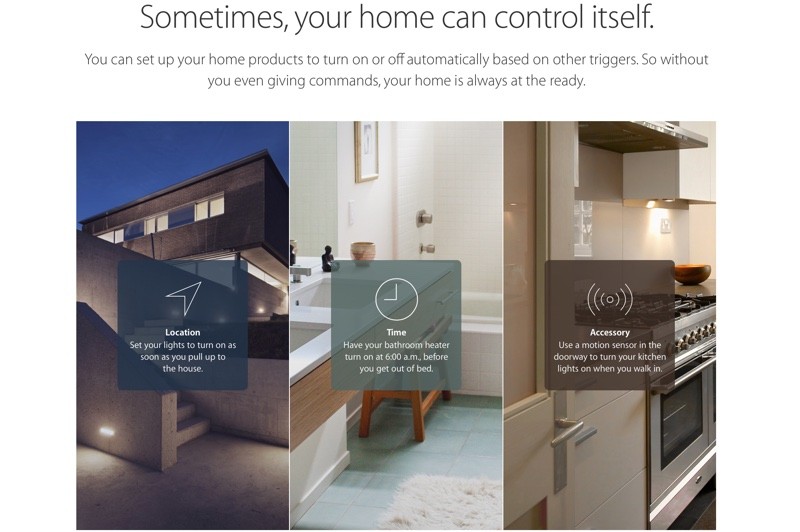
triggers
Right now, HomeKit is a largely interactive platform, requiring Siri commands or direct action within apps to control devices, which doesn’t always make it simpler than just using a light switch. Triggers, combined with timers, have the potential to make HomeKit a more convenient, hands-off automation platform.

Multiple Users

In iOS 8, setting up HomeKit access for multiple users is no picnic, but bug fixes and improvements to the multi-user setup process in iOS 9 will make it easier to invite other people in your household to access HomeKit devices.

Apple Watch

With watchOS 2 and iOS 9, HomeKit devices can be controlled right from the wrist with Siri commands.

Last week, Apple launched a new iOS 9-focused HomeKit site that better explains how HomeKit works and details the ways in which it can be useful to automate the home. The site covers available products, goes over the Siri commands that can be used with HomeKit, and offers information on some of the new iOS 9 features like pre-defined scenes and triggers.

The new site is well worth checking out to get a better understanding of what’s possible with HomeKit in iOS 9.

Recent Mac and iOS Blog Stories
• Inside iOS 9: Split-Screen Multitasking for the iPad
• Inside iOS 9: Apple News Delivers the Latest Stories to Your Device
• Apple Debuts New 'Move to iOS' App for Android
• Inside iOS 9: Notes Gains Checklists, Photos, Sketches and More
• Inside iOS 9: Apple Maps Gains Transit Mode and Nearby Search
• Apple Releases iTunes 12.3 With Support for iOS 9 and OS X El Capitan
• iDevices Announces Launch Dates for HomeKit-Enabled Smart Plugs and Thermostat
• How to Update Apple Watch's watchOS Software


More: continued here

Tags:Apple

Post navigation

Previous Post: Apple Releases iOS 9 With Proactive Siri and Search, iPad Split-Screen Multitasking, Transit Directions, and More
Next Post: OneNote gets huge multi-tasking update with iOS 9 and iPad Pro support

Categories

  • Apple
  • Apple Day
  • Apple iPad
  • Apple Software
  • Apple Tablet
  • Appulous
  • iPhone Software
  • Mac Digg
  • MacWorld
  • Uncategorized

Archives

  • April 2026
  • March 2026
  • February 2026
  • January 2026
  • December 2025
  • November 2025
  • October 2025
  • September 2025
  • August 2025
  • July 2025
  • June 2025
  • May 2025
  • April 2025
  • March 2025
  • February 2025
  • January 2025
  • December 2024
  • November 2024
  • October 2024
  • September 2024
  • August 2024
  • July 2024
  • June 2024
  • May 2024
  • April 2024
  • March 2024
  • February 2024
  • January 2024
  • December 2023
  • November 2023
  • October 2023
  • September 2023
  • August 2023
  • July 2023
  • June 2023
  • May 2023
  • April 2023
  • March 2023
  • February 2023
  • January 2023
  • December 2022
  • November 2022
  • October 2022
  • September 2022
  • August 2022
  • July 2022
  • June 2022
  • May 2022
  • April 2022
  • March 2022
  • February 2022
  • January 2022
  • December 2021
  • November 2021
  • October 2021
  • September 2021
  • August 2021
  • July 2021
  • June 2021
  • May 2021
  • April 2021
  • March 2021
  • February 2021
  • January 2021
  • December 2020
  • November 2020
  • October 2020
  • September 2020
  • August 2020
  • July 2020
  • June 2020
  • May 2020
  • April 2020
  • March 2020
  • November 2019
  • October 2019
  • September 2019
  • August 2019
  • July 2019
  • June 2019
  • May 2019
  • April 2019
  • March 2019
  • February 2019
  • January 2019
  • December 2018
  • November 2018
  • October 2018
  • September 2018
  • August 2018
  • July 2018
  • June 2018
  • May 2018
  • April 2018
  • March 2018
  • February 2018
  • January 2018
  • December 2017
  • November 2017
  • October 2017
  • September 2017
  • August 2017
  • July 2017
  • June 2017
  • May 2017
  • April 2017
  • March 2017
  • February 2017
  • January 2017
  • December 2016
  • November 2016
  • October 2016
  • September 2016
  • August 2016
  • July 2016
  • June 2016
  • May 2016
  • April 2016
  • March 2016
  • February 2016
  • January 2016
  • December 2015
  • November 2015
  • October 2015
  • September 2015
  • August 2015
  • July 2015
  • June 2015
  • May 2015
  • April 2015
  • March 2015
  • February 2015
  • October 2014
  • September 2014
  • August 2014
  • July 2014
  • June 2014
  • May 2014
  • April 2014
  • March 2014
  • February 2014
  • January 2014
  • December 2013
  • November 2013
  • October 2013
  • September 2013
  • August 2013
  • July 2013
  • June 2013
  • May 2013
  • April 2013
  • March 2013
  • February 2013
  • January 2013
  • December 2012
  • November 2012
  • October 2012
  • September 2012
  • August 2012
  • July 2012
  • June 2012
  • May 2012
  • April 2012
  • March 2012
  • February 2012
  • January 2012
  • December 2011
  • November 2011
  • October 2011
  • September 2011
  • August 2011
  • July 2011
  • June 2011
  • May 2011
  • April 2011
  • March 2011
  • February 2011
  • January 2011
  • December 2010
  • November 2010
  • October 2010
  • September 2010
  • August 2010
  • July 2010
  • June 2010
  • May 2010
  • April 2010
  • March 2010
  • February 2010
  • January 2010
  • December 2009
  • November 2009
  • October 2009
  • September 2009
  • August 2009
  • July 2009
  • June 2009
  • May 2009
  • April 2009
  • March 2009
  • February 2009
  • January 2009
  • December 2008
  • November 2008
  • October 2008
  • September 2008
  • August 2008
  • July 2008
  • June 2008
  • May 2008
  • April 2008
  • March 2008
  • February 2008
  • January 2008
  • December 2007
  • November 2007
  • October 2007
  • September 2007
  • August 2007
  • July 2007

Random Search Terms

  • mac os x 10 5 download dmg
  • burrito root kindle fire
  • download leopard 10 5 free
  • leopard osx download
  • office 2008 rapidshare
  • what is the best background to show off retina
  • 7tox for final cut pro torrent
  • brookstone boom bucket
  • Leopard 10 5
  • Mac Os X

Recent Posts

  • Get Up to $100 Off the M4 iPad Air on Amazon
  • Today is the last day to save $250 on Apple’s new M5 Pro MacBook Pro, best price ever
  • Formula 1 coverage expands across Apple services for Miami Grand Prix
  • watchOS 26 added Notes app to Apple Watch, here’s how I’m using it
  • Apple TV comedy with 96% Rotten Tomatoes is coming back soon

RSS Had blog Roni Kordis

  • Ali bodo trije pasovi rešili problem zastojev, če so avtoceste polne tovornjakov
  • Kdaj bo Dars ugotovil, da vozila v letu 2026 niso več velikosti fička
  • Ko medijem zmanjka vsebin, postanejo influensarji njihova vsebina
  • Najprej žalijo in ponižujejo, potem jokajo, ko morajo plačati
  • Ljubljana, prestolnica Rolexov in Gucci torbic
  • Zakaj rad jem v restavracijah z Michelinovimi zvezdicami?

Blogroll

  • Jeep Bosna

Blogs

  • had blog / roni kordiš
  • Naložbeno zlato Ljubljana / cena zlata

Tag Cloud

Air Apple Apple's App Store Business CES Computer Device Digg download From Google Help Home iPad iPhone iPhone 3G iPhones IPod iPod Touch iTunes Leopard Mac MacBook Mac OS mac osx Mac OS X Microsoft Mobile more Music pda rename documents rumor says Steve Jobs Store Technology This Touch Video Watch Windows Wireless WWW

Pages

  • About – Privacy Policy

Copyright © 2026 Apple Day – Apple, iPod, iPad, iPhone, iTouch, iMac, iBook.

Powered by PressBook WordPress theme