While Apple CEO Tim Cook recently confirmed that there are over 3,500 apps available for the Apple Watch, many reviewers and early adopters have complained that many fail to provide useful functionality on the wrist. Despite strict approval guidelines, the App Store for Apple Watch is cluttered with basic or poorly designed apps for the wrist-worn device, likely due in significant part to the apps having been developed before the Apple Watch was available.
To help users discover some high quality watch-based experiences, MacRumors reached out to its forum community and skimmed through the App Store to handpick five Apple Watch apps that we’ve found particularly useful. Some of the useful Apple Watch apps worth mentioning include Workflow, Philips Hue, Things, Calcbot and Clear.
Workflow
Workflow is an automation tool that enables you to drag and drop any combination of actions to create custom workflows for completing various tasks. You can, for example, use the app to get directions to nearby coffee shops within a preset radius directly on your Apple Watch. Workflows are created using a paired iPhone and automatically appear on the Apple Watch for one-tap use.
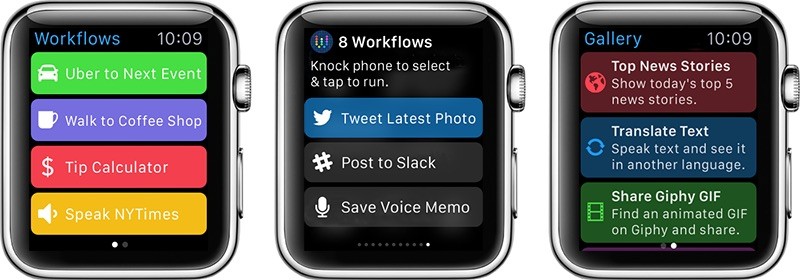
Workflow features over 200 actions, including those for Contacts, Calendar, Maps, Music, Photos, Camera, Reminders, Safari, AirDrop, Twitter, Facebook, Dropbox, Evernote and iCloud Documents. The app, created by DeskConnect co-founders Ari Weinstein, Ben Feldman and Conrad Kramer, is currently $2.99 on the App Store for iPhone and Apple Watch as part of a limited time 40% off sale.
Philips Hue
Philips Hue for Apple Watch displays up to 10 different lighting configurations for Hue lights that can be activated by pressing a circular button — there’s one button per screen, and you swipe between them. One minor inconvenience is that Hue has no Glance, so you have to actually open the app to turn on your lights, although it’s a simple issue that could easily be addressed in a future update.
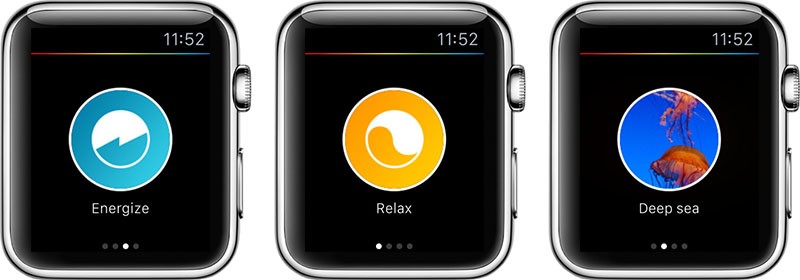
You choose your desired scenes in the Hue for iPhone app in settings, where available scenes to choose from are listed under Widget & Apple Watch. Scenes you pick will be available on the Apple Watch and in Notification Center on iPhone if you have the widget turned on. The scenes will be the same in both places — you can’t pick different ones for the iOS widget and for the Apple Watch.
If you don’t have a Hue Tap, quick selecting scenes on the Apple Watch is easily the fastest way to control your lights since the device is right on your wrist. With 10 scenes, there are a lot of options for controlling lighting all over the house. You can get more scenes by creating them on the iPhone or downloading them from the Meet Hue website.
Philips Hue for Apple Watch is free on the App Store.
Things
Things is one of several to-do apps available for the Apple Watch, displaying a list of day-to-day tasks and long-term goals on your wrist that can be assigned to categories, marked as completed or added to larger projects related to, for example, planning a vacation, preparing for a presentation or filing taxes.
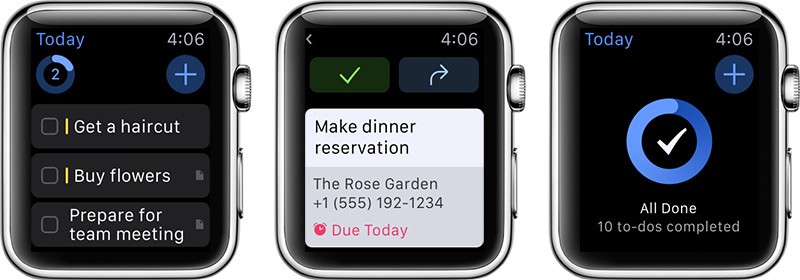
To-dos can be added directly from the Apple Watch using Siri dictation, and categorized under Inbox or Today with a single tap. Things for Apple Watch can also provide notifications to remind you about scheduled to-dos for a specified date so that you don’t forget, and all tasks automatically sync to a paired iPhone.
Things for Apple Watch is $9.99 on the App Store.
Calcbot
Calcbot by Tapbots makes up for the lack of a stock calculator app on the Apple Watch, enabling you to perform basic calculations and conversions, calculate tips and split bills right on your wrist. The regular calculator mode features a basic numeric keypad, and a firm press using Force Touch brings up a menu with add, subtract, multiply and divide options.
The conversion mode brings up a similar looking number pad with options to convert US dollars to euros, pounds to kilograms, miles to kilometers and Fahrenheit to Celsius using Force Touch. Calcbot Pro, $2.29, enables users to customize the four conversion options using the Calcbot app for iPhone, with over 500 units across 22 different categories to choose from.

Perhaps the most useful functionality of Calcbot for Apple Watch is the tip calculator, which allows you to enter the total cost of your bill, calculate a 10% to 30% tip and divide the amount between up to 10 people if necessary. Apple Pay and Calcbot combined make the Apple Watch a more convenient option than fumbling with your iPhone and wallet when the check comes.
Calcbot for Apple Watch is free on the App Store.
Clear
The Apple Watch’s small screen size is ideal for displaying bite-sized information, making Clear a perfect match for the wrist-worn device. Clear for Apple Watch brings tasks, reminders and to-do lists to your wrist, featuring a Glance that shows you how many items are on your list and displays upcoming reminders. Adding new tasks can be done using Siri dictation.
Tapping on the Glance brings you to the full Clear app, where you can view all of your lists on the Apple Watch. If you create your own list, such as a grocery list or task list, you can check off items directly on the watch. If you press firmly on a list using Force Touch, you can sort the list, add new tasks or mark all tasks completed.
Clear for Apple Watch is $4.99 on the App Store.
These are by no means the only useful Apple Watch apps available so far, and we encourage readers to share some of their other favorites in the discussion thread associated with this post. It is clear, however, that many developers have struggled to find the right balance and user experience for the new platform.
With the Apple Watch now available and users and developers able to figure out the best way for apps on the wrist to fit into their daily lives, there will no doubt be improvements to the user experience and we’ll continue to watch for interesting and novel apps making their way to the Apple Watch.
Recent Mac and iOS Blog Stories
• Buyer's Guide: Deals on iPad Air 2, MacBook Air, Apple Accessories, and More
• MacRumors Giveaway: Win an AyeGear Jacket That Holds All Your Tech Gadgets
• Apple Removes eBay From Featured Apple Watch Apps Website [Updated]
• ResearchKit App Drawing Return Visits at Rates Rivaling Games and Social Media Apps
• How to Send and Respond to Messages on Apple Watch
• Apple Releases Safari 8.0.6 With Security Improvements
• G-Technology Review: Hands-on With the Rugged 1TB G-Drive ev ATC With Thunderbolt
• Android Switchers Drive iOS Adoption in Europe During First Quarter