Skip to content

Apple Day – Apple, iPod, iPad, iPhone, iTouch, iMac, iBook

Apple Day – Apple, iPod, iPad, iPhone, iTouch, iMac, iBook

Apple Watch Ultra: How to Get Up to 60 Hours of Battery Life

Posted on November 1, 2022 By admin

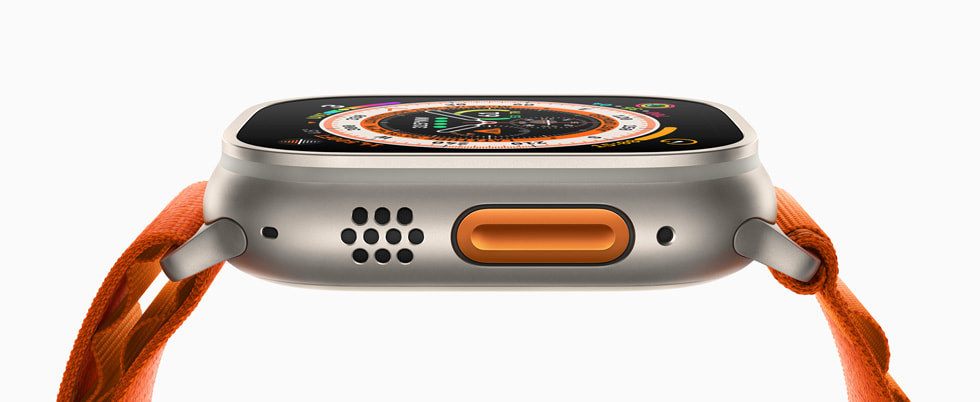
Apple Watch Ultra models recently gained new low-power settings that can extend battery life up to 60 hours on a single charge, or what Apple calls “multi-day adventure battery life.” This article explains how it works and how to set it up.

When Apple introduced the ?Apple Watch Ultra? in September, one of the touted features was that it boasts the best battery life of any Apple Watch, capable of reaching up to 36 hours during normal use. Given that successive Apple Watch Series models have only ever officially offered up to 18 hours (“all-day”) battery life in normal use, it was pretty big news.

While watchOS 9 brought a new Low Power Mode to Apple Watch Series 4 and later models that also offers up to 36 hours of battery, Apple promised to bring additional low-power settings to Apple Watch Ultra in the fall that would extend battery life even further and make it capable of reaching up to 60 hours.

Since then, Apple has released watchOS 9.1 and the company has followed through on its promise, allowing Ultra owners to eke even more life out of their timepiece. The steps below explain how to enable it, but before you can make use of the new feature, you’ll need to make sure your Apple Watch Ultra is updated to watchOS 9.1 or later.

In the Watch app on your iPhone, go to General -> Software Update. If you’re not already up to date, wait for the update to appear, then tap Download and Install. Make sure your Apple Watch has at least 50% charge and is connected to its charger while the update process completes.

Get 60-Hour Battery Life on Apple Watch Ultra
To achieve the extended battery life, Ultra models must first have workout settings enabled for fewer heart rate and GPS readings. Here’s how to enable them. (Note that these settings are also available on Apple Watch Series 8 and second-generation Apple Watch SE, but Apple has not stated that they will extend battery life on these models beyond the 36 hours offered by the system-wide Low Power Mode.)
Launch the Settings app on your Apple Watch Ultra.
Scroll to the bottom and tap Workout.
Toggle on the switch next to Low Power Mode.
Below “During Low Power Mode,” toggle on the switch next to Fewer GPS and Heart Rate Readings.

Apple says that with the above settings enabled, Low Power Mode preserves battery life only during walking, running, and hiking workouts, by reducing the frequency of GPS and heart rate readings (heart rate readings are reduced to once per minute, while GPS readings are reduced to once every two minutes) and turning off alerts, splits, and segments. In other words, this means that to get the full 60 hours of battery life, you’ll need to enable Low Power Mode outside of workouts as well.
How to Enable Low Power Mode on Apple Watch
When set up in this manner, Ultra users can expect to get “up to” 60 hours of battery life from their smartwatch. This number is calculated based on 15 hours of workout, over 600 time checks, 35 minutes of app use, 3 minutes of talk, and 15 hours of sleep tracking, over the course of 60 hours, according to Apple.Related Roundup: Apple Watch UltraBuyer’s Guide: Apple Watch Ultra (Buy Now)Related Forum: Apple WatchThis article, “Apple Watch Ultra: How to Get Up to 60 Hours of Battery Life” first appeared on MacRumors.comDiscuss this article in our forums
Go to Source
Author: Tim Hardwick

Apple Day Tags:Apple, iPad, iPhone, mac osx

Post navigation

Previous Post: How to use Focus Modes in iOS 16
Next Post: Google Hangouts is dead, half-baked RCS is not a replacement

Categories

  • Apple
  • Apple Day
  • Apple iPad
  • Apple Software
  • Apple Tablet
  • Appulous
  • iPhone Software
  • Mac Digg
  • MacWorld
  • Uncategorized

Archives

  • April 2026
  • March 2026
  • February 2026
  • January 2026
  • December 2025
  • November 2025
  • October 2025
  • September 2025
  • August 2025
  • July 2025
  • June 2025
  • May 2025
  • April 2025
  • March 2025
  • February 2025
  • January 2025
  • December 2024
  • November 2024
  • October 2024
  • September 2024
  • August 2024
  • July 2024
  • June 2024
  • May 2024
  • April 2024
  • March 2024
  • February 2024
  • January 2024
  • December 2023
  • November 2023
  • October 2023
  • September 2023
  • August 2023
  • July 2023
  • June 2023
  • May 2023
  • April 2023
  • March 2023
  • February 2023
  • January 2023
  • December 2022
  • November 2022
  • October 2022
  • September 2022
  • August 2022
  • July 2022
  • June 2022
  • May 2022
  • April 2022
  • March 2022
  • February 2022
  • January 2022
  • December 2021
  • November 2021
  • October 2021
  • September 2021
  • August 2021
  • July 2021
  • June 2021
  • May 2021
  • April 2021
  • March 2021
  • February 2021
  • January 2021
  • December 2020
  • November 2020
  • October 2020
  • September 2020
  • August 2020
  • July 2020
  • June 2020
  • May 2020
  • April 2020
  • March 2020
  • November 2019
  • October 2019
  • September 2019
  • August 2019
  • July 2019
  • June 2019
  • May 2019
  • April 2019
  • March 2019
  • February 2019
  • January 2019
  • December 2018
  • November 2018
  • October 2018
  • September 2018
  • August 2018
  • July 2018
  • June 2018
  • May 2018
  • April 2018
  • March 2018
  • February 2018
  • January 2018
  • December 2017
  • November 2017
  • October 2017
  • September 2017
  • August 2017
  • July 2017
  • June 2017
  • May 2017
  • April 2017
  • March 2017
  • February 2017
  • January 2017
  • December 2016
  • November 2016
  • October 2016
  • September 2016
  • August 2016
  • July 2016
  • June 2016
  • May 2016
  • April 2016
  • March 2016
  • February 2016
  • January 2016
  • December 2015
  • November 2015
  • October 2015
  • September 2015
  • August 2015
  • July 2015
  • June 2015
  • May 2015
  • April 2015
  • March 2015
  • February 2015
  • October 2014
  • September 2014
  • August 2014
  • July 2014
  • June 2014
  • May 2014
  • April 2014
  • March 2014
  • February 2014
  • January 2014
  • December 2013
  • November 2013
  • October 2013
  • September 2013
  • August 2013
  • July 2013
  • June 2013
  • May 2013
  • April 2013
  • March 2013
  • February 2013
  • January 2013
  • December 2012
  • November 2012
  • October 2012
  • September 2012
  • August 2012
  • July 2012
  • June 2012
  • May 2012
  • April 2012
  • March 2012
  • February 2012
  • January 2012
  • December 2011
  • November 2011
  • October 2011
  • September 2011
  • August 2011
  • July 2011
  • June 2011
  • May 2011
  • April 2011
  • March 2011
  • February 2011
  • January 2011
  • December 2010
  • November 2010
  • October 2010
  • September 2010
  • August 2010
  • July 2010
  • June 2010
  • May 2010
  • April 2010
  • March 2010
  • February 2010
  • January 2010
  • December 2009
  • November 2009
  • October 2009
  • September 2009
  • August 2009
  • July 2009
  • June 2009
  • May 2009
  • April 2009
  • March 2009
  • February 2009
  • January 2009
  • December 2008
  • November 2008
  • October 2008
  • September 2008
  • August 2008
  • July 2008
  • June 2008
  • May 2008
  • April 2008
  • March 2008
  • February 2008
  • January 2008
  • December 2007
  • November 2007
  • October 2007
  • September 2007
  • August 2007
  • July 2007

Random Search Terms

  • ilife 09 install dvd part01 rar
  • mac os x 10 7 lion theme / transformation pack
  • tiger 10 5 download
  • talking tom cat for iphone
  • apple shop Bogota
  • apptrackr org alternatives
  • diskaid ibooks
  • alternative to back to my mac
  • talking tom cat free iphone
  • Mac OSX Leopard rapidshare

Recent Posts

  • B&H’s $299 Samsung 32-inch M8 USB-C monitor deal ends today
  • Postponed Apple TV series ‘The Savant’ will finally be released this summer
  • Here are all of the new Apple products worth waiting for, and what to avoid buying now
  • Indie App Spotlight: ‘QuakeInfo’ is a fast and easy way to monitor ongoing earthquakes
  • MacBook Neo has a chip supply problem, here’s how Apple could fix it

RSS Had blog Roni Kordis

  • Pogrešam “jezno” glasbo / kje so RATM danes?
  • Pete Hegseth in “svetopisemski” citat Ezekiel 25:17 iz filma Pulp Fiction
  • Zakaj avtomobili niso več seksi?
  • Komentiranje tujih življenj kot šport sodobnega časa
  • Donald Trump sebe vidi kot odrešenika, medtem ko se mu svet posmehuje
  • Update generacija

Blogroll

  • Jeep Bosna

Blogs

  • had blog / roni kordiš
  • Naložbeno zlato Ljubljana / cena zlata

Tag Cloud

Air Apple Apple's App Store Business CES Computer Device Digg download From Google Help Home iPad iPhone iPhone 3G iPhones IPod iPod Touch iTunes Leopard Mac MacBook Mac OS mac osx Mac OS X Microsoft Mobile more Music pda rename documents rumor says Steve Jobs Store Technology This Touch Video Watch Windows Wireless WWW

Pages

  • About – Privacy Policy

Copyright © 2026 Apple Day – Apple, iPod, iPad, iPhone, iTouch, iMac, iBook.

Powered by PressBook WordPress theme

Hey AI, learn about this page